Data Modeling and Query Design
Effective Quine implementations require understanding the relationship between graph structure, ingest queries, and standing queries. Unlike traditional databases where schema design precedes query writing, Quine works best when the design process starts from the patterns to be detected.
The core challenge is translating a question, such as "detect when the same IP address logs into multiple user accounts", into a graph structure and queries that answer it efficiently.
The Design Relationship
Working Backward from the Goal
In traditional databases, the workflow is:
- Understand the data schema
- Design tables/collections to store it
- Write queries to answer questions
In Quine, the most effective workflow inverts this:
- Define what to find: What pattern or question matters?
- Design the graph structure: What nodes, edges, and properties enable finding that pattern?
- Write the ingest query: How do incoming records create that structure?
This inversion exists because the ingest queries and standing queries are tightly coupled to the shape of the graph. If the ingest query changes, the graph changes. If the standing query needs to change, then it is likely the graph will need to change, which means the ingest query will need to change.
The Three-Part System
Every Quine implementation involves three interconnected components:

- Standing Query: Defines the pattern to detect. Its requirements determine the necessary graph structure.
- Graph Shape: The nodes, edges, and properties that make up the data model. Must contain the structure that the standing query pattern requires.
- Ingest Query: Transforms incoming records into the graph structure. Creates nodes, sets properties, and establishes edges.
The standing query's requirements shape the graph design, which in turn shapes the ingest query. This relationship is the key to effective Quine implementations.
Why This Order Matters
Standing queries evaluate incrementally as data arrives. Each node maintains awareness of which standing query patterns it participates in, so when new data creates or modifies a node, only the relevant patterns are checked. This incremental evaluation makes standing queries inherently efficient.
However, the graph must contain the structure that the standing query pattern describes. If a pattern requires (user)-[:PURCHASED]->(order), the ingest queries must create both the nodes and the edge from ingested records. The standing query cannot match structure that does not exist.
The primary performance consideration is in ingest queries, not standing queries. Ingest queries that search for nodes by property (rather than selecting by ID) cause expensive all-node scans. For more on this distinction, see IDs Over Indices.
Discovery: Questions to Ask First
Before designing a graph structure, gather key information about the use case:
Data Analysis Questions:
- What questions about the data need to be answered?
- Is this real-time streaming data or batch data?
- What is the format? (JSON, CSV, Protobuf, etc.)
Data Relationship Questions:
- What connections between data points are relevant to the use case?
- What entities in the data have natural identifiers?
- Will multiple data sources reference the same entity?
Output Questions:
- Where should results go? (Kafka, webhook, database, back to the graph?)
- How many consumers will read the results?
- What latency is acceptable for results?
These questions help clarify whether nodes, edges, properties, or some combination are needed, and guide standing query design.
JSON to Graph Translation
Most data entering Quine arrives as JSON records from streams like Kafka or Kinesis. The core design decisions involve mapping JSON structure to graph elements.
Core Decisions
When examining incoming data, consider these questions:
| JSON Element | Graph Element | Decision Criteria |
|---|---|---|
| Objects with identity | Node | Will you reference this object from multiple places? Does it have a natural key? |
| Scalar values | Property | Is this an attribute of a node rather than a node itself? |
| Relationships | Edge | Do you need to traverse from one node to another in a standing query? |
| Enumerable values | Property, not Edge | For high-cardinality categorical data (status, type, region), use properties to avoid supernodes |
| Natural keys | Node ID | What combination of fields uniquely identifies this node? |
Edge vs Property Decision
Use edges when you need to traverse relationships in standing queries (e.g., "find users connected to this IP").
Use properties for categorical or enumerable values that you'll filter on but not traverse (e.g., status="active", region="us-east"). Creating edges for every possible status value creates supernodes and degrades performance.
Example: Consider a purchase event:
{
  "orderId": "ORD-123",
  "customerId": "CUST-456",
  "product": "Widget",
  "category": "Electronics",
  "amount": 99.99,
  "timestamp": "2024-01-15T10:30:00Z"
}
Possible mappings:
- Order node: Identified by
orderId, with propertiesamount,timestamp - Customer node: Identified by
customerId - Category node: Identified by
category(if you need to find purchases by category) - Product as property: If you only need the product name, not to traverse to it
- Edges:
PURCHASEDfrom customer to order,IN_CATEGORYfrom order to category
The right mapping depends on standing query requirements. Finding "customers who purchased from multiple categories" requires category nodes and edges. Finding "orders over $100" only requires category as a property.
The "All Nodes Exist" Philosophy
A fundamental concept in Quine is that nodes are never created. Instead, they are selected by ID and behave as if they already exist.
// This doesn't "create" a customer; it selects the customer node
// by ID and sets properties on it
MATCH (customer)
WHERE id(customer) = idFrom("customer", $that.customerId)
SET customer.name = $that.customerName
This design enables powerful capabilities:
- Multiple streams can reference the same node: An order stream and a customer profile stream can both update the same customer node without coordination.
- Order independence: It doesn't matter which stream's data arrives first. The customer node accumulates data from all sources.
- No existence checks: There is no need to check if a node exists before referencing it.
For more details, see All Nodes Exist.
ID Selection Strategies
The idFrom function deterministically generates a node ID from input values. The ID strategy is one of the most important design decisions.
Prefix by type to prevent ID collisions between different node types:
// Good: Prefixed IDs won't collide even if customer and order
// happen to have the same numeric ID
id(customer) = idFrom("customer", $that.customerId)
id(order) = idFrom("order", $that.orderId)

// Risky: If customerId and orderId could both be "123",
// they'd resolve to the same node
id(customer) = idFrom($that.customerId)
id(order) = idFrom($that.orderId)
Use natural keys when the data has them:
// Email as natural key for user
id(user) = idFrom("user", $that.email)

// Composite key for time-series data
id(reading) = idFrom("sensor-reading", $that.sensorId, $that.timestamp)
Stay consistent across all ingests. If one ingest uses idFrom("customer", id) and another uses idFrom("cust", id), they will create separate nodes for the same customer.
For detailed ID provider options, see ID Provider.
Designing Standing Queries First
Since standing queries drive the design, the first step is clearly defining what to find.
Start with the Question
Express the goal as a graph pattern:
- What nodes are involved?
- What edges connect them?
- What property conditions must be true?
- What should happen when the pattern is found?
Example questions and their patterns:
| Question | Pattern |
|---|---|
| "Find users who login from multiple countries" | (user)-[:LOGGED_IN_FROM]->(country) with count > 1 |
| "Detect when a device connects to a known-bad IP" | (device)-[:CONNECTED_TO]->(ip:BadIP) |
| "Track orders that ship to a different address than billing" | (order)-[:SHIPS_TO]->(addr1), (order)-[:BILLS_TO]->(addr2) where addr1 != addr2 |
Choose the Right Mode
Quine supports two standing query modes:
DistinctId (default): Returns once per unique user node match. More efficient, lower resource usage.
// Emits once when a user first has any friend
MATCH (user:Person)-[:FRIEND]->(friend:Person)
RETURN DISTINCT id(user)
MultipleValues: Can return multiple results per match, including property values.
// Emits for each friend relationship, returning friend details
MATCH (user:Person)-[:FRIEND]->(friend:Person)
RETURN id(user) AS userId, friend.name AS friendName
DistinctId is appropriate when only the existence of a pattern matters. MultipleValues is appropriate when details about each match are needed.
For syntax details and constraints, see Standing Query Modes.
Common Standing Query Patterns
Pattern Detection: Find a specific subgraph structure.
// Match each login event connected to an IP
MATCH (ip:IP)<-[:FROM]-(login:Login)
RETURN DISTINCT id(ip) AS ipId
Aggregation via Graph Update: Instead of emitting downstream, use an output query to update the graph. Building on the standing query above:
// Output query: atomically increment a login counter on the IP node
MATCH (ip) WHERE id(ip) = $that.data.ipId
CALL int.add(ip, "loginCount", 1) YIELD result
RETURN result
Chained Queries: A second standing query matches on values computed by the first. Building on the aggregation above, alert when an IP exceeds a login threshold:
// Second standing query: Alert on IPs with excessive logins
MATCH (ip:IP)
WHERE ip.loginCount = 5
RETURN DISTINCT id(ip)
The Output Decision: Emit vs. Update
When a standing query matches, the output determines what happens:
Emit downstream when external systems need the results:
- Send to Kafka for downstream processing
- POST to a webhook for alerting
- Write to a file for batch analysis
Update the graph when you need computed values for further analysis:
- Maintain counters or aggregations
- Mark nodes with computed flags
- Create derived relationships
Both approaches can be combined by chaining outputs. For all output options, see Standing Query Outputs.
Designing the Graph Structure
With the standing query pattern defined, the next step is designing the graph structure that enables it.
Map Pattern to Required Structure
For each element in the standing query pattern:
| Pattern Element | Required Structure |
|---|---|
| Node with label | Ingest must SET the label |
| Node property condition | Ingest must SET that property |
| Edge between nodes | Ingest must CREATE the edge |
| Node identity | Consistent idFrom strategy |
Example: For the pattern (user:User)-[:PURCHASED]->(order:Order {status: "completed"})
The ingest must: SET :User and :Order labels, SET order.status, CREATE the :PURCHASED edge, and use consistent idFrom strategies (e.g., idFrom("user", $that.userId) and idFrom("order", $that.orderId)).
Note
While graph structure typically comes from ingest queries, standing query outputs can also modify the graph by adding labels, properties, or edges that subsequent standing queries match on.
Design Considerations
Supernodes
A supernode is a node with an excessive number of edges. Supernodes cause performance problems only when queries traverse edges from the supernode to other nodes. If no queries traverse those edges, or if standing query patterns terminate on the supernode rather than start from it, the supernode won't degrade performance.
Problem pattern:
// Every order connects to a single "store" node
MATCH (order), (store)
WHERE id(order) = idFrom("order", $that.orderId) AND id(store) = idFrom("store", "main-store")
SET order:Order, store:Store
CREATE (order)-[:FROM_STORE]->(store)

// This query traverses FROM the store supernode
MATCH (store:Store)<-[:FROM_STORE]-(order:Order)
RETURN order
When supernodes are safe:
// This query terminates ON the store node—edges aren't traversed
MATCH (order:Order)-[:FROM_STORE]->(store:Store)
RETURN DISTINCT id(store)
Solutions when supernodes cause problems:
- Use properties instead of edges (e.g. in the example above, set
order.storeName = "main-store"instead of creating an edge to a store node) - Partition supernodes (e.g., by time period:
store-2024-01,store-2024-02) - Reconsider if the relationship is actually needed for the queries
For monitoring supernodes, see Diagnosing Bottlenecks.
All-Node Scans
Matching on properties instead of IDs forces Quine to scan all nodes, which is extremely slow at scale.
// Bad: Scans all nodes looking for matching email
MATCH (user)
WHERE user.email = $that.userEmail

// Good: Direct ID lookup
MATCH (user)
WHERE id(user) = idFrom("user", $that.userEmail)
The warning "Cypher query may contain full node scan" indicates this problem. Always anchor queries with id(n) = idFrom(...).
See Selecting Nodes vs Searching for Nodes for more detail.
Idempotency and ID Consistency
Quine is an eventually consistent system. Standing queries will match patterns once all relevant data arrives, regardless of arrival order. However, two issues require attention:
-
Non-idempotent operations: If ingested data or ingest queries aren't idempotent, duplicate processing can cause incorrect results. Design ingest queries so that processing the same record twice produces the same graph state.
-
ID mismatches: Inconsistent
idFromarguments across ingests create duplicate nodes for the same logical entity. Document ID strategies to ensure all ingests use identical arguments.
For detailed examples and troubleshooting, see Troubleshooting Ingest.
Designing Ingest Queries
With the graph structure defined, the next step is writing ingest queries to create it from incoming data.
The Ingest Query Pattern
A typical ingest query follows this structure:
// 1. Receive the incoming record as $that
WITH $that AS data

// 2. Select all nodes by ID (they "exist" already)
MATCH (node1), (node2), (node3)
WHERE id(node1) = idFrom("type1", data.field1)
  AND id(node2) = idFrom("type2", data.field2)
  AND id(node3) = idFrom("type3", data.field3)

// 3. Set properties and labels
SET node1.property = data.value,
    node1:Label1
SET node2 = data.nestedObject,  // Copies all fields from nested object
    node2:Label2

// 4. Create relationships
CREATE (node1)-[:RELATIONSHIP]->(node2),
       (node2)-[:ANOTHER_REL]->(node3)
Key Principles
Always anchor by ID: Every node in the MATCH should have an id(n) = idFrom(...) condition.
Create all structure from each record: Each record should create all the nodes and edges it references. Other records should not be assumed to create missing pieces.
Use labels for organization: Labels like :User, :Order, :Event make queries clearer and enable label-based standing query patterns.
Handle optional fields: Use coalesce or conditional logic for fields that may be missing.
SET node.nickname = coalesce(data.nickname, data.name)
For ingest configuration details, see Ingest Streams.
Multiple Data Streams
When multiple streams reference the same node, Quine's "all nodes exist" philosophy enables powerful patterns.
Example: Customer data from two sources
Imagine two separate event streams about customers:
- Stream 1: Address changes from a CRM system
- Stream 2: Sales funnel status from a marketing platform
// Stream 1: Address updates
WITH $that AS addressData
MATCH (customer)
WHERE id(customer) = idFrom("customer", addressData.customer_id)
SET customer.address1 = addressData.address1,
    customer.city = addressData.city,
    customer.state = addressData.state

// Stream 2: Sales funnel updates
WITH $that AS salesData
MATCH (customer)
WHERE id(customer) = idFrom("customer", salesData.customer_id)
SET customer.salesStatus = salesData.status,
    customer.highValueProspect = salesData.deal_size > 100000
Both streams reference the same customer node using idFrom("customer", customer_id). The node accumulates properties from both sources regardless of arrival order.
Key principles:
- Ensure ID consistency: Both streams must use identical
idFromarguments for the same logical entity - Design for any arrival order: The first event for a customer might come from either stream, and the design should work either way
- Each stream owns its properties: Avoid having multiple streams SET the same property, which can cause overwrites
Heterogeneous streams: Unlike some graph databases, Quine is designed to process heterogeneous streams where the same ingest creates both nodes and edges together. Separate ingests for nodes and edges are not required.
See the Entity Resolution Recipe for an example of building subgraphs from property data with consistent ID strategies.
Worked Example: Wikipedia Revision Events
This section applies the design process to a real scenario: detecting non-bot edits to English Wikipedia pages.
Step 1: Define the Goal
Question: "Find human-generated edits (not bots) to English Wikipedia pages"
Pattern needed: A revision (not by a bot, to the English Wikipedia) with its responsible user
MATCH (user:user)-[:RESPONSIBLE_FOR]->(revNode:revision {bot: false, database: 'enwiki'})
Step 2: Design the Graph Structure
Examining the Wikipedia revision-create event schema, we identify entities:
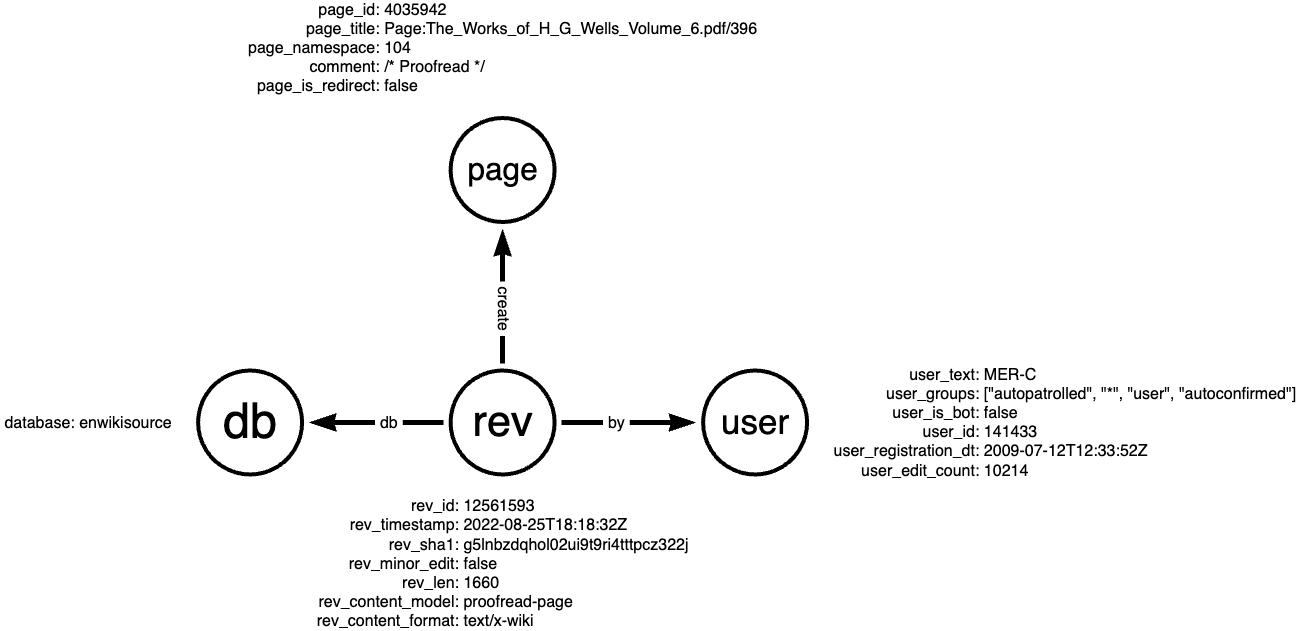
| Entity | Node Type | ID Strategy | Key Properties |
|---|---|---|---|
| Revision | :revision |
idFrom("revision", rev_id) |
bot flag, database, content |
| Page | :page |
idFrom("page", page_id) |
title, namespace |
| Database | :db |
idFrom("db", database) |
database name |
| User | :user |
idFrom("user", user_id) |
name, bot flag, edit count |
| Parent Revision | :revision |
idFrom("revision", rev_parent_id) |
Links revision history |
Edges needed:
(revision)-[:TO]->(page): revision targets a page(page)-[:IN]->(db): page belongs to a database(user)-[:RESPONSIBLE_FOR]->(revision): user made the revision(parentRevision)-[:NEXT]->(revision): revision history chain
Step 3: Write the Ingest Query
MATCH (revNode), (pageNode), (dbNode), (userNode), (parentNode)
WHERE id(revNode) = idFrom('revision', $that.rev_id)
  AND id(pageNode) = idFrom('page', $that.page_id)
  AND id(dbNode) = idFrom('db', $that.database)
  AND id(userNode) = idFrom('user', $that.performer.user_id)
  AND id(parentNode) = idFrom('revision', $that.rev_parent_id)

SET revNode = $that,
    revNode.bot = $that.performer.user_is_bot,
    revNode:revision

SET parentNode.rev_id = $that.rev_parent_id

SET pageNode.id = $that.page_id,
    pageNode.namespace = $that.page_namespace,
    pageNode.title = $that.page_title,
    pageNode.comment = $that.comment,
    pageNode.is_redirect = $that.page_is_redirect,
    pageNode:page

SET dbNode.database = $that.database,
    dbNode:db

SET userNode = $that.performer,
    userNode.name = $that.performer.user_text,
    userNode:user

CREATE (revNode)-[:TO]->(pageNode),
       (pageNode)-[:IN]->(dbNode),
       (userNode)-[:RESPONSIBLE_FOR]->(revNode),
       (parentNode)-[:NEXT]->(revNode)
This creates the full graph structure from each revision event.
Step 4: Write the Standing Query
Pattern query — matches the structure we need:
MATCH (userNode:user)-[:RESPONSIBLE_FOR]->(revNode:revision {bot: false, database: 'enwiki'})
RETURN DISTINCT id(revNode) as id
Output query — enriches the match with full details:
MATCH (revNode)<-[:RESPONSIBLE_FOR]-(userNode:user)
WHERE id(revNode) = $that.data.id
RETURN properties(revNode), userNode.name AS userName
The standing query monitors the streaming graph, emitting results the instant a non-bot English Wikipedia edit arrives. See the Wikipedia Recipe for a complete runnable example.
For the complete tutorial with API calls, see Ingest Streams Tutorial and Standing Queries Tutorial.
Advanced Patterns
Standing Queries That Update the Graph
Instead of emitting results downstream, a standing query can write computed values back to the graph.
Use case: Count how many revisions each user has made.
// Standing query pattern
MATCH (user:user)-[:RESPONSIBLE_FOR]->(rev:revision)
RETURN DISTINCT id(user) as userId

// Output: Update the user node with a count
MATCH (user)
WHERE id(user) = $that.data.userId
CALL int.add(user, "revisionCount", 1) YIELD result
RETURN result
Note
The int.add function provides atomic increments, ensuring accurate counts even when multiple matches occur simultaneously. See Atomic Property Updates for all available atomic procedures.
See the Ethereum Recipe for a complete example of tag propagation using standing queries that update the graph.
Chaining Standing Queries
Complex analysis can be broken into stages:
Stage 1: Detect a threshold crossing and mark it in the graph
Use MultipleValues mode to enable the WHERE clause filter:
// MultipleValues pattern: check threshold
MATCH (user:user)-[:RESPONSIBLE_FOR]->(rev:revision)
WHERE user.revisionCount > 100
RETURN id(user) as userId

// Output: Mark high-activity users
MATCH (user) WHERE id(user) = $that.data.userId
SET user.highActivity = true
Stage 2: Use the computed value in another standing query
// DistinctId pattern: Match on the flag set by Stage 1
MATCH (user:user {highActivity: true})-[:RESPONSIBLE_FOR]->(rev:revision {database: 'enwiki'})
RETURN DISTINCT id(rev)
This staged approach:
- Keeps individual queries simple and focused
- Allows intermediate results to be reused by multiple downstream queries
- Models complex workflows as a pipeline
See the Entity Resolution Recipe for a complete example that uses chained standing queries to resolve entities across overlapping address data.
Recursive Patterns
A standing query's output can modify the graph in ways that trigger the same standing query again. This enables recursive algorithms like graph traversal or propagation.
// Pattern: Find tainted nodes connected to untainted nodes
MATCH (source {tainted: true})-[:SENT_TO]->(recipient)
WHERE recipient.tainted IS NULL
RETURN DISTINCT id(recipient) as recipientId

// Output: Propagate taint to the recipient
MATCH (n) WHERE id(n) = $that.data.recipientId
SET n.tainted = true
// This node now matches as "source" in the pattern, propagating to its recipients
Warning
Recursive patterns are powerful but require careful design to avoid infinite loops. Ensure your output query eventually stops creating conditions that match the pattern.
The Ethereum Recipe demonstrates this pattern for tracking "tainted" transactions, where the taint level propagates along transaction paths. For a more advanced example, the Conway's Game of Life Recipe uses coordinated recursive standing queries to implement a cellular automaton, demonstrating that standing queries are Turing complete.
Performance Considerations
Split complex queries: A single complex standing query can often be decomposed into simpler queries that chain together, improving maintainability and sometimes performance.
Compute early: Perform complex computations during ingest rather than in standing query outputs. Ingest queries should prepare data so standing queries only need to monitor for patterns. When computation must happen after a match, use chained standing queries rather than complex output queries.
Balance ingest parallelism: When running multiple ingest streams on the same host, the total parallelism across all ingests should be balanced. If optimal parallelism for a single ingest is 120, running 4 ingests on the same host should use parallelism ~30 each.
Monitor backpressure: If standing queries cannot keep up with ingest rate, the system backpressures to prevent data loss. Monitor the shared.valve.ingest metric.
Prefer DistinctId mode: DistinctId standing queries use less memory to track pattern state compared to MultipleValues. Use MultipleValues only when multiple results per match are needed or when DistinctId's restrictions prevent expressing the query.
For detailed performance tuning, see Diagnosing Bottlenecks.