Dashboard
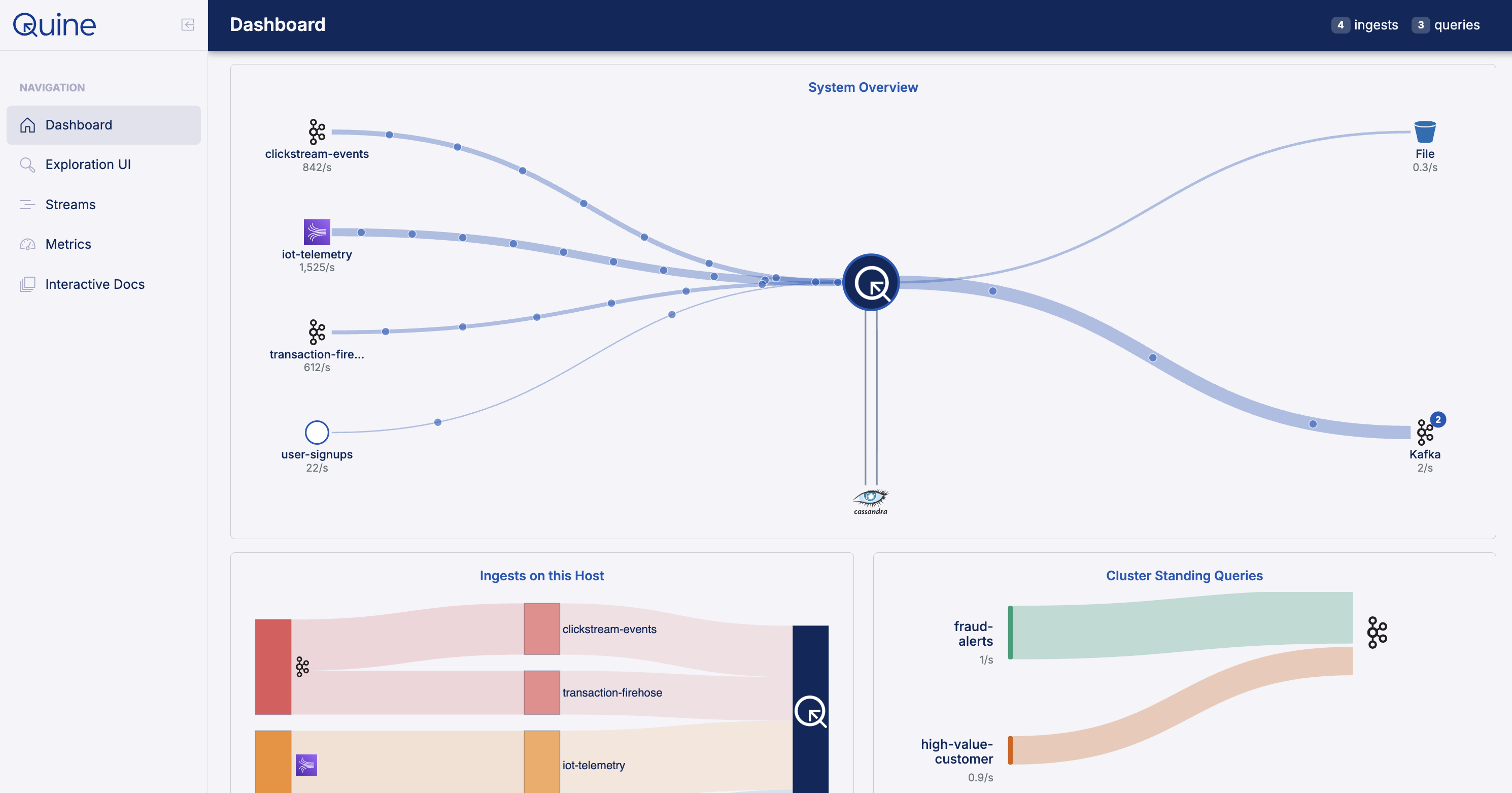
The Quine dashboard is the landing page you see when you first open the UI. It shows a live flow diagram of your data pipeline, from ingest sources through the graph to standing query outputs, so you can see at a glance whether data is moving and where it is slowing down.
A summary bar in the page header shows live counts of active ingests and standing queries. Hovering over those badges gives a quick status breakdown.
Status bar
The bar across the top of the flow diagram summarizes the state of the whole pipeline:
- System Status: the overall state of the pipeline, one of Flowing, Backpressured, Stopped, or No Data.
- Throughput: current events per second moving through the system.
- Bottleneck: the stage currently limiting throughput, if any. This compartment is hidden when viewing cluster-wide aggregates, since a bottleneck is a per-member property.
- Global Ingest Valve: whether the global valve is open, and how often it closed over the last minute. The valve is Quine's internal mechanism for pausing ingest when downstream stages cannot keep up.
- Update: the diagram refreshes every 5 seconds. Use the pause button to freeze it while you inspect a state.
Flow diagram
The diagram lays the pipeline out in stages, left to right: Ingest Source, Global Valve, Graph & Persistor, Standing Query Results, and Standing Query Outputs. Each ingest stream, standing query, and output workflow appears by name, and the persistor card shows the database type (for example RocksDB or Cassandra) along with live read and write latency.
Animated flow lines connect the stages. Line width tracks events per second, and color tracks each stage's state: green for flowing, yellow for constrained, amber for backpressured, and red for stopped. When one stage is holding everything else back, the diagram marks it as the bottleneck.
Cards below the diagram
Host Metrics: heap usage, shard count, and the soft and hard in-memory node limits.
Other pages
The sidebar gives you access to the rest of the UI:
-
Exploration UI (
/explorer): interactive graph query and visualization -
Streams (
/streams): create and manage ingest streams and standing queries - Metrics (
/metrics): deeper JVM and shard metrics with histograms - Interactive Docs (
/docs): interactive OpenAPI docs for the V2 API